MAC's Simple NPC integration
Using the Talk to NPC objective
To use the Talk to NPC objective, first create a special dialogue line for the NPC. Go to the Dialogue setup and create a new dialogue. Enter the speech you want and create at least one answer with the MQS Continue quest action from the supported addons. When the player chooses this answer, the quest continues and the dialogue closes.
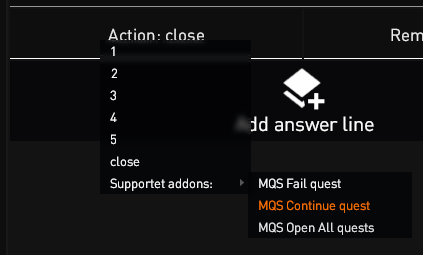
The MQS Fail quest action works the same way as MQS Continue quest, but fails the quest.
To use this dialogue in the objective, remember the dialogue ID, save the NPC and open the Talk to NPC objective. Select your NPC and enter the dialogue ID. After saving the quest you will have a working Talk to NPC objective.
Enable Start the dialogue automatically to open the dialogue as soon as the objective starts, for example for a phone call or a radio message.
Note. Don't make this dialogue line the one that opens when players just talk to the NPC. Choosing an answer with the MQS Continue quest or MQS Fail quest action outside of the quest can break other quests.
You can also create more complex dialogues from the start line, but at least one answer must lead to the MQS Continue quest action, so players don't get stuck in the quest.
Spawning NPCs during a quest
The [MCS] Spawn npc event spawns a MAC's Simple NPC for the quest, and removes it when the quest ends. Enable Remove the NPC with this ID instead to remove it earlier. Combine it with the Leave area LP objective to make the player leave the place where the NPC was spawned.
The Spawn npc event can also copy the look of an MCS NPC (model, skin, bodygroups and materials): enter mcsnpc+<npc id> as the model.
Linking multiple quests to an NPC
If you are creating a new NPC to give quests, choose the [MQS] Use the NPC for the quest system option in the editor.

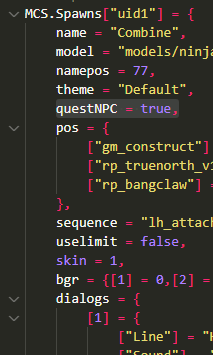
To add this option to an existing NPC with a small Lua edit, go to the mc_simple_npcs/lua/mcs_npcs folder and edit the sh_npcspawn.lua file. Find the NPC table you want to edit and add the questNPC = true, parameter to the main table.
To make the NPC open the list of all its quests, set the action of the answer you need to MQS Open All quest from the supported addons list.
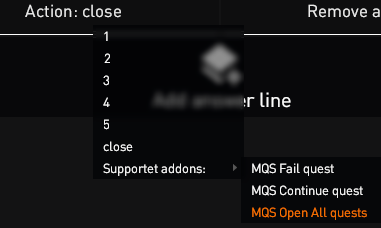
Or edit the Lua the same way and change the action to MQS Open All quest:
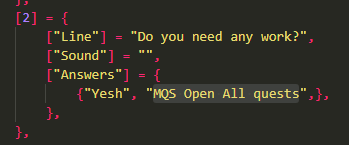
Starting a quest from a specific answer
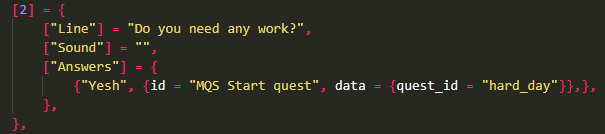
To start one quest from a specific answer, edit the Lua the same way as for opening the menu. Go to the mc_simple_npcs/lua/mcs_npcs folder and edit the sh_npcspawn.lua file. Find the NPC table and the answer you need, and replace the "close" parameter with {id = "MQS Start quest", data = {quest_id = "id_test"}}, where id_test is your quest ID.